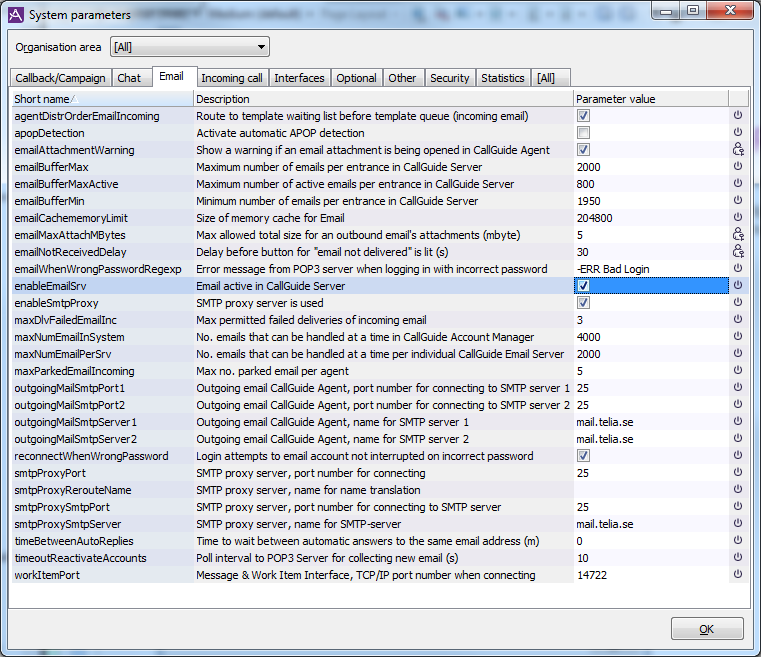
In the ACE Admin System parameters window and its Email tab you configure email related parameters. The basic requirement is that the enableEmailSrv parameter must be ticked.
In case the Work item function is being used, the WorkItem system parameter must be configured with the port number ACE WorkItem Server is going to listen to, i.e. the port number for the open interface where external applications send in messages for new work items. If several servers will be used they must be located on different computers because the same port number is used.
When ACE Server is started, one ACE Account Manager and one or more instances of ACE Email Server (depending on how large the system is) will be started. All emails at the accounts polled by ACE Email are collected and placed in queue. If too many emails are collected, the time for routing and collecting will be negatively affected. Regardless of the number of emails sent in to ACE, other media must not stop functioning. See Sketch over an email’s way in to an agent for a sketch of what ACE Account Manager and ACE Email Server does and how they relate.
For best performance and reduced risk of overload, use the following system parameters.
- maxNumEmailInSystem
- Sets the upper limit to the number of emails to be handled by ACE Email Account Manager. Protects ACE Email from performance problems (e.g. inflicted by an email attack) by limiting the number of emails that is allowed to be fetched into the ACE system as a whole. If the system contains more than one instance of ACE Email Server, the total number of emails being active in the instances of ACE Email Server can never exceed the value of this parameter.
- maxNumEmailPerSrv
- Sets the upper limit to the number of emails to be handled by each instance of ACE Email Server in the system. This parameter can be used to prevent an instance of ACE Email Server to "starve". An example of starvation

The value of the parameter should normally be set to the value of maxNumEmailInSystem divided by the number of instances of ACE Email Server in the system. In a system with only one instance of ACE Email Server, the value of the two parameters should thus be the same. To ensure that all entrances get emails even if one entrance, i.e. one POP3 account, has enough mail to fill up an entire ACE Email Server, there is also a built in feature - emailBufferMax
- Sets the maximum number of emails to be buffered in an email entrance, to protect ACE Server from performance problems. However, when the entrance’s limit is exceeded, new email will still be sent to the same server, until the maxNumEmailInSystem limit is reached. This can delay email from a more important entrance on the same server.
Note that there are several other system parameters for ACE Email, see System parameters for email.
To prevent a so called starvation of an important mail entrance you do like this:
- Place the important email entrance on a separate email server
- In System parameters for email, set maxNumEmailInSystem to 10000 and maxNumEmailPerSrv to 5000.