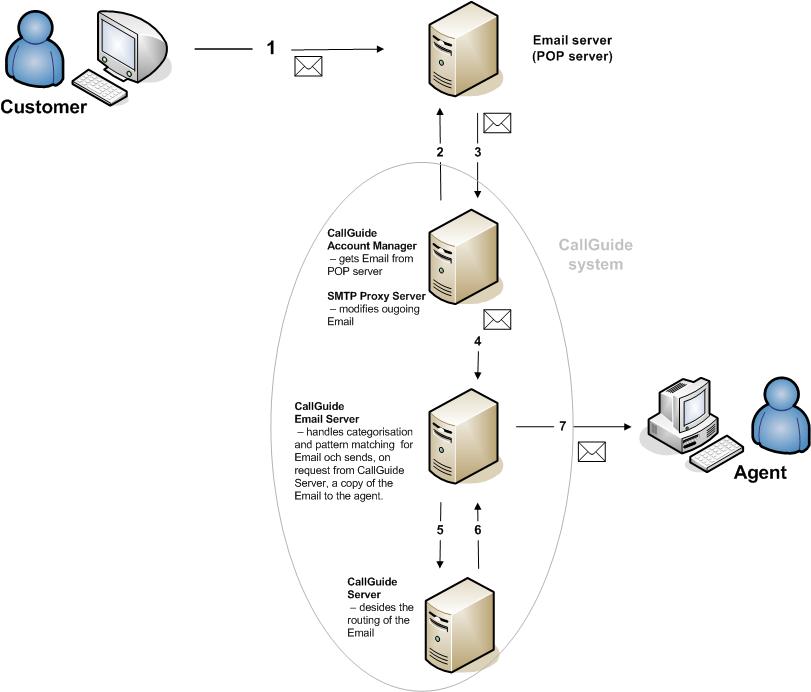
The following example describes an email’s way from customer to agent:
- The customer sends an email, ending up in your company's email server.
- ACE Account Server regularly logs on to the email server to check if any emails have arrived at ACE's email entrances.
- When an email has arrived, ACE Account Server downloads a copy of the email.
- The email is sent to ACE Email Server. Categorisation and pattern matching of emails take place there. Results, if any, are stored in contact data keys.
- ACE Email Server sends contact data to ACE Server asking for routing instructions.
- When ACE Server has determined where the email is to be routed, information is sent back to ACE Email Server.
- A copy of the email is sent to the intended agent.
When the agent replies to an email, the email passes the SMTP Proxy Server which is part of the ACE Account Manager service. The SMTP Proxy Server has the means to modify and store outgoing emails. These functions can e.g. be used to hide the sender and not reveal the agent’s email address to the customer.